In the app
Report issues and send feedback from SmartSeat without leaving the tool. It is the fastest route because the report arrives with the session context. This is how we prefer you to contact us.
Step-by-step instructions just belowThree channels to resolve SmartSeat questions and incidents, in recommended order of use.
Report issues and send feedback from SmartSeat without leaving the tool. It is the fastest route because the report arrives with the session context. This is how we prefer you to contact us.
Step-by-step instructions just belowTo talk to us directly. Questions about rollout, rooms, NFC and training.
If the problem blocks the class or has to do with other IE systems (e.g. BlackBoard, MFA, Wifi).
Open SmartSeats from Blackboard or at smartseat.ie-edu.lovable.app.
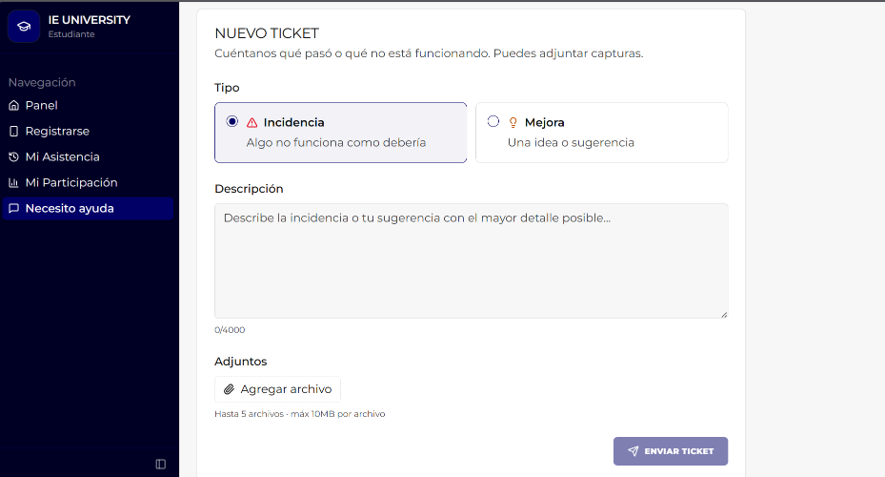
In the side menu click “I need help” and then “New ticket”.
Choose the type: Issue if something isn't working as it should, Improvement if it's an idea or suggestion.
Describe the case with course, group, date, time and room, and attach screenshots (up to 5 files, 10 MB each).
Click “Send ticket”: it reaches the project team and is escalated to IT Innovation and Right Decisions when needed.

Issue cases: unresponsive NFC tag, incorrect session or roster, attendance not reaching Blackboard, access error. Improvement cases: usability improvements, suggestions about the seating chart or the reports.